CFR-Fotomessung für HundeCFR photo measurement for dogs
Ein Foto.
Drei Punkte.
Eine Messung.
One Photo.
Three Points.
One Measurement.
Ein seitliches Kopffoto, drei selbst gesetzte Punkte: Caniometrie macht das Verhältnis von Nasen- und Schädellänge im Bild nachvollziehbar.
A side-view photo and three points you place yourself: Caniometrie makes the ratio of muzzle length to cranial length visible in the image.
Android · In Erprobung · Noch nicht im StoreAndroid · In testing · Not yet in stores
So funktioniert es
How it works
Foto auswählen
Select Photo
Öffnen Sie ein vorhandenes, seitliches Profilfoto Ihres Hundes direkt aus Ihrer lokalen Galerie.
Open an existing, side-view profile photo of your dog directly from your local gallery.
Punkte setzen
Place Points
Platzieren Sie die drei Messpunkte manuell: A (Nase), B (Stopp) und C (Hinterhaupt).
Manually place the three measuring points: A (Nose), B (Stop), and C (Occiput).
Ergebnis speichern
Save Result
Die App berechnet das Verhältnis der geraden Strecken AB zu BC und erstellt ein Ergebnisbild zum Speichern oder Teilen.
The app calculates the ratio of the straight-line distances AB and BC and generates a result image for saving or sharing.
Die Messung bleibt in Ihrer Hand
You stay in control of the measurement
Auswertung auf dem Gerät
On-device measurement
Die aktuelle Testversion berechnet die Messung lokal. Erst wenn Sie ein Ergebnis selbst teilen, übergeben Sie es an die gewählte andere App.
The current test version calculates the measurement locally. When you choose to share a result, it is passed to the other app you select.
Nachvollziehbare Kontrolle
Transparent Control
Sie setzen und prüfen die Messpunkte selbst. Die eingezeichneten Strecken machen die Berechnung nachvollziehbar.
You place and check the points yourself. The marked lines show how the result is calculated.
Klares Ergebnisbild
Clear Result Image
Generiert ein fertiges Bild mit eingezeichneten Linien und dem berechneten CFR-Wert zur Dokumentation.
Generates a final image with drawn lines and the calculated CFR value for your documentation.
Vor der MessungBefore measuring
Ein gutes Foto
macht den Unterschied.A good photo
makes the difference.
Fotografieren Sie den Kopf genau von der Seite und auf Kopfhöhe. Halten Sie etwas Abstand statt aus nächster Nähe zu fotografieren: So verringern Sie perspektivische Verzerrungen. Mit leichtem Zoom bleibt der Kopf gut erkennbar.Photograph the head directly from the side, with the camera at head height. Keep some distance rather than shooting close up to reduce perspective distortion. Use a little zoom to keep the head clearly visible.
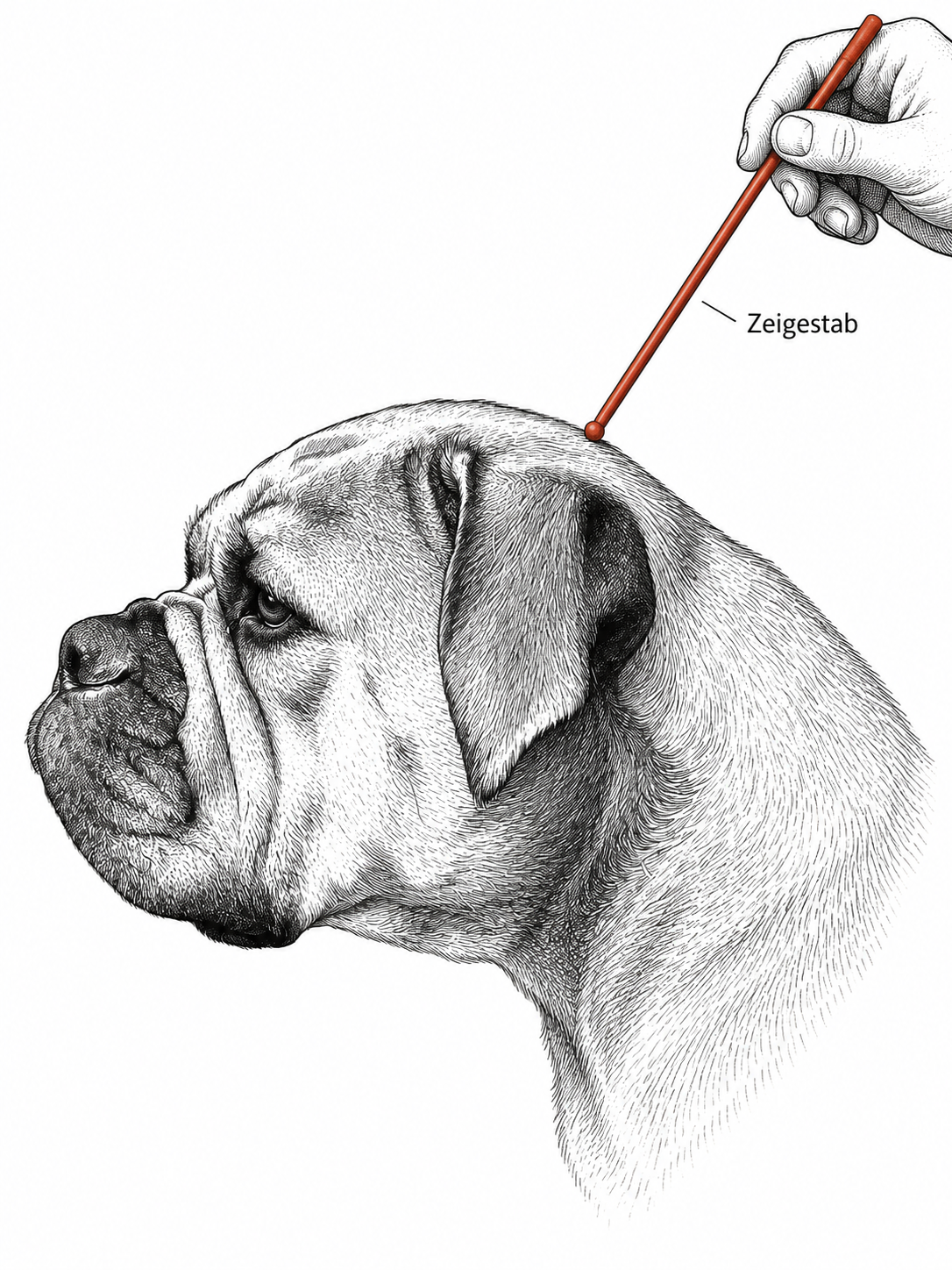
Den hinteren Schädelpunkt zuvor ertasten und mit einem stumpfen Zeigestab sichtbar machen. Kopf und Zeigerspitze müssen auf dem Foto klar erkennbar sein. Die App führt anschließend durch die drei Messpunkte.Palpate the rear skull landmark first and make it visible with a blunt pointer. The head and pointer tip must be clearly visible in the photo. The app then guides you through the three measurement points.
Entwicklungsstand & FAQ
Development Status & FAQ
Aktuell in Erprobung
Currently in Testing
Die Android-App befindet sich derzeit in einer internen Testphase und ist noch nicht veröffentlicht. Ein Link zum Google Play Store wird hier bereitgestellt, sobald die App offiziell verfügbar ist.
The Android app is currently in an internal testing phase and is not yet published. A link to the Google Play Store will be provided here as soon as the app is officially available.
Welche Geräte und Sprachen sind geplant?Which devices and languages are planned?
Wir beginnen mit Android. Deutsch und Englisch sind bereits in der Testversion enthalten. Eine Version für iPhone und iPad ist mitgeplant; einen Veröffentlichungstermin gibt es noch nicht.We are starting with Android. German and English are already included in the test version. An iPhone and iPad version is planned; no release date has been announced.
Hat die App eine eigene Kamera-Funktion?
Does the app have its own camera function?
Nein. Sie wählen ein vorhandenes seitliches Foto aus Ihrer Galerie. Die Hilfe erläutert, worauf bei Aufnahme und Punktsetzung zu achten ist.
No. You choose an existing side-view photo from your gallery. The help explains what to consider when taking the photo and placing points.
Warum gibt es keine automatische Erkennung?
Why is there no automatic point detection?
In dieser Version setzen Sie die Punkte selbst und können sie vor dem Speichern prüfen und korrigieren. Eine automatische Erkennung ist nicht enthalten.
In this version, you place the points yourself and can check and adjust them before saving. Automatic detection is not included.
Handelt es sich um ein medizinisches Diagnose-Tool?
Is this a medical diagnostic tool?
Nein. Caniometrie ist ein reines Hilfsmittel zur mathematischen Berechnung des Streckenverhältnisses AB/BC in Fotografien. Aufnahme und Punktsetzung beeinflussen den Wert. Die Genauigkeit der Fotomethode ist noch nicht validiert. Der Wert allein erlaubt keine Aussage über Gesundheit oder Zuchtzulassung.
No. Caniometrie is purely a tool for mathematical calculation of the distance ratio AB/BC in photographs. Photo quality and point placement affect the value. The accuracy of the photographic method has not yet been validated. The value alone does not establish health status or breeding eligibility.
Im Gespräch bleibenLet’s stay in touch
Interesse an Caniometrie?Interested in Caniometrie?
Fragen zur App oder Interesse aus Zucht und Verein? Schreiben Sie Heiko Schmidt.Questions about the app or interest from breeders and clubs? Contact Heiko Schmidt.
E-Mail schreibenSend an email